App Store Screenshots That Convert in 2026: Patterns From the Top 100
A great icon will earn you a tap. Great screenshots earn you the install. We pulled apart the listings of the top 100 grossing apps in 2026 to find the visual patterns that actually move the conversion needle — and the mistakes that quietly sink most launches.

Why screenshots matter more than your icon
Apple's own developer documentation is candid about it: the App Store product page is the single most consequential conversion surface in the iOS ecosystem. Within that page, screenshots — specifically the first three above the fold — are responsible for the bulk of the install decision. Industry studies consistently show that listings with optimised screenshots see 25–50% higher conversion-to-install rates than baseline. For a paid acquisition team buying installs at $3–$8 a pop, that's not a rounding error.
The icon is a 1024 px square that lives in a sea of 1024 px squares. It earns a tap. The screenshots earn the install. And critically, they are the only place on the listing where you control both the message and the visual context — title and subtitle are constrained to 30 characters, and the description is mostly invisible without a tap-to-expand. The screenshot canvas is where ASO actually happens.
Five patterns from top-converting App Store listings
We looked at the listings of every app in the US top 100 grossing chart in Q1 2026. Across categories — gaming, finance, social, productivity, health — the same five visual patterns showed up over and over.
Pattern 1: Bold value proposition in the first screenshot
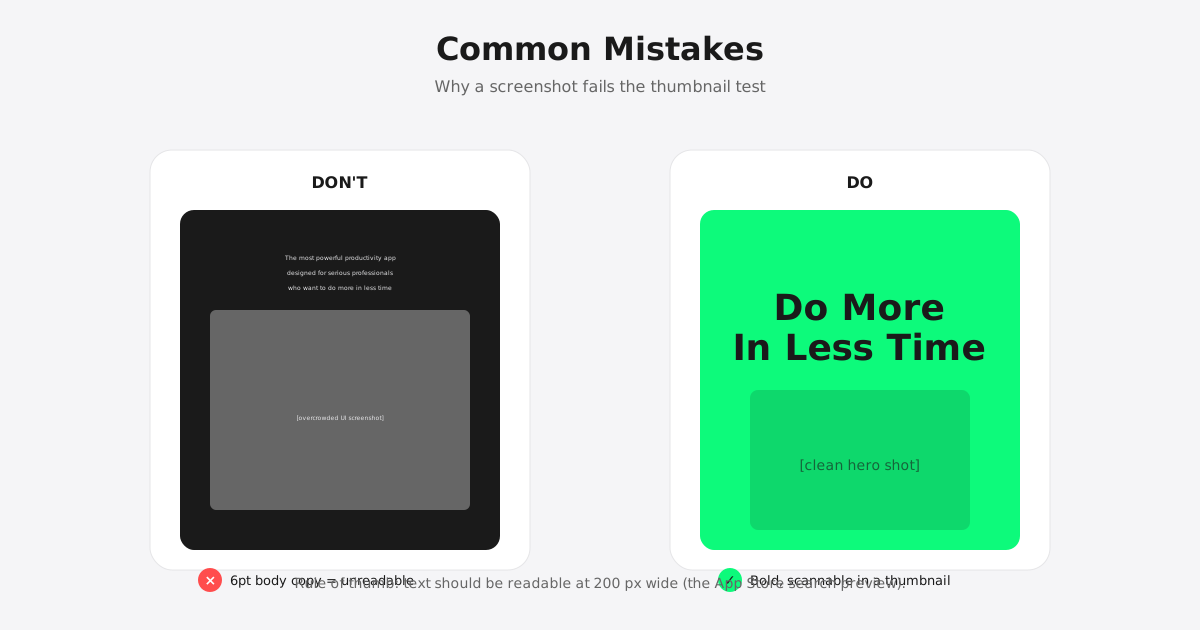
The first screenshot is a billboard, not a UI screenshot. The top performers use it to communicate a single sharp value claim — "Track every dollar in 30 seconds," "10-minute meditations that actually work," "Crush bigger numbers" — in oversized typography, paired with a stylized, colored background and a small device frame showing one supporting screen. The job of slot 1 is to answer "why install this" before the user has to think.

Pattern 2: Show the outcome, not the UI
Most product teams ship screenshots of features. Top-converting teams ship screenshots of outcomes. Calm doesn't show you a meditation timer; it shows you a person who looks calm. Robinhood doesn't show you a trade form; it shows you a portfolio chart trending up. Notion doesn't show you a database; it shows you a finished, beautifully formatted document. The difference: outcomes trigger desire, UIs trigger evaluation. Desire converts. Evaluation hesitates.
Pattern 3: Use a consistent visual rhythm
Cycle through any top-100 listing and you'll notice the screenshots feel like one piece of content, not ten. The colour palette is shared across every frame. The typography lockup repeats. The device frames are placed in the same spot. This rhythm creates a sense of polish and professionalism that maps directly to perceived product quality. It also makes scrolling feel like watching a story rather than skimming a feature list.
Pattern 4: One message per screenshot
The temptation, especially for early-stage teams, is to cram every feature into every frame. Don't. The best-performing listings give each screenshot a single, dedicated message — one headline, one feature shot, one supporting line — and then move on. Apps that try to do four things per screenshot dilute every single one of them. Apps that pick one thing per screenshot let users absorb seven distinct reasons to install.
Pattern 5: Localise for each market
The single highest-leverage change you can make to an existing listing is to localise screenshots per market — not just translate the headline, but redesign the whole frame so that the social proof, the imagery, and even the colour palette resonate locally. Headspace ships meaningfully different screenshots for the US, Spain, Germany and Japan. So does Duolingo. So should you. We've seen 30%+ install lifts in non-English markets just from properly localised screenshot sets.

Common mistakes to avoid
If the patterns above are what high performers do, the patterns below are what most teams accidentally do. Each one quietly costs you installs.
- Text too small to read. Your screenshots will be displayed at thumbnail size in search results. Headlines need to be readable at 200 px wide on a phone. If your test in Figma at 50% zoom is illegible, ship bigger type.
- Generic stock photography. Lifestyle stock photos read as "this is what every app on the store uses." They generate no recognition and no desire. If you need people in your screenshots, hire a photographer or commission custom illustrations.
- No value proposition. Showing "the app exists" is not a value prop. Tell users what they get and why it's better than the status quo. Specificity beats vague aspiration every single time.
- Inconsistent colours and branding. If your icon, screenshots, and in-app UI use three different palettes, users perceive inconsistency as poor quality. Lock in a screenshot brand system before you ship the first frame.
- No social proof. Numbers convert. "4.8 stars · 250,000 reviews" lives in the listing chrome but you can also bake "Trusted by 2 million users" into a dedicated social-proof screenshot. The top 100 do this almost universally.
The 3-second test
Before you ship a screenshot set, run it through what we call the 3-second test. Show the first screenshot to someone who has never seen the app. Cover it after three seconds. Ask them three questions: What does the app do? Who is it for? Why would I want it? If they can't answer all three, the screenshot has not done its job — and you will pay for that gap in every paid acquisition channel for the life of the app.
The 3-second test is brutal because the App Store is brutal. Users scroll through search results at 200 ms per listing. They are not reading carefully. They are pattern-matching against intent. Your screenshot has to do its work in less time than it takes to blink twice.
Localisation: don't ship the same screenshots globally
We touched on this in pattern 5, but it deserves a section of its own because it is the single most undervalued ASO investment. The argument against localisation is "we'll get to it later" — and "later" almost never happens. The cost is real (design + translation + cultural adaptation), but the conversion lift is also real and compounds across every paid and organic install for the life of the listing.
If you are looking for a design partner with deep localisation chops, we've worked extensively in the Spanish-speaking and Hebrew-speaking markets. Our perspective on regional studio benchmarks is captured in Best Design Studios in Spain 2026 and Best Design Studios in Israel.
Ship faster: resize once, export every size
Once you've nailed the design, the bottleneck shifts from creative to production. A modern App Store listing requires multiple iPhone sizes (6.9", 6.7", 6.5", 5.5"), multiple iPad sizes, optional Apple Watch sizes — multiplied by the number of screenshots in your set, multiplied by every locale you ship in. For a five-screenshot, five-language listing that's well over a hundred individual exports per release. The math gets ugly.
That's exactly why we built Verox App Screenshot Resizer. Drop your master 6.9" PNGs in, choose the device sizes you need, and download a zip of pixel-perfect Apple-compliant assets. Free, no signup, runs entirely in your browser — your masters never leave your machine. If you want the full dimension reference behind it, see App Store Screenshot Dimensions 2026: Complete Cheat Sheet.
Try it free: Verox App Screenshot Resizer →

Want Verox to design your store listing?
Designing screenshots that actually convert requires three things: visual taste, a sharp understanding of what your install funnel currently looks like, and the discipline to write copy that respects how little time users actually give you. We've shipped App Store assets for fintech, gaming, and SaaS launches with combined download counts in the millions. See our work, or start a conversation if you'd like a partner who treats screenshots as a real conversion surface — not a screenshot-of-the-app afterthought.

Stop guessing. Ship screenshots that convert.
Use the patterns above, run the 3-second test, then ship every required size in one click with our free tool.
Open the free tool →